Distributed Chroma: Bring Your Own Cloud#
Authored by Jason Vigil
Authored by Jason Vigil
To support enterprise customers with strict operational and security requirements, Chroma offers a “Bring Your Own Cloud” (BYOC) deployment model. This deployment option allows you to run Chroma within your own cloud infrastructure while still benefiting from management and support by Chroma's engineering team.
Here are some of the key features of Chroma BYOC that differentiate it from other deployment models:
This post provides a technical overview of how the deployment model works in practice, to give an idea of what to expect when deploying and running Chroma BYOC in your own environment.
Before jumping into deploying Chroma BYOC, it’s important to first consider if it’s actually the correct deployment model for your use case. Though we designed the product to minimize operational burden, the added overhead of maintaining a Chroma BYOC deployment is non-zero, both for Chroma and for you. Additionally, under the BYOC model, you will run all of the infrastructure backing Chroma in your own cloud environment, meaning you will pay a fixed minimum cost for running the Chroma infrastructure.
It’s worth noting here that Chroma Cloud, our public managed version of distributed Chroma, was built with multi-tenancy, performance, and security as primary goals. It’s SOC II Type 2 compliant, includes a fully-featured dashboard UI, and provides usage-based billing. We find it to be a solid solution for most customers. That being said, probably the main reason why you would need Chroma BYOC is if your security and compliance requirements mandate that your data must reside within your own infrastructure. For those types of strict requirements, Chroma BYOC is by far the ideal deployment option, given that it includes operational support from the Chroma team for managing your mission-critical database infrastructure.
After determining that Chroma BYOC is the right deployment model for your use-case, it’s time to get down to the nuts & bolts of sizing the Chroma deployment. The first step is to spec out your workload so that Chroma can help recommend a sufficiently-sized deployment.
To size a deployment, there are several questions to consider:
For a detailed breakdown of the concepts raised by these questions, you can refer to our docs page: Look at Your Data.
After working with you to size your deployment, Chroma will generate a baseline cost estimate for running the infrastructure in your cloud environment. Now comes the exciting part, it’s time to deploy Chroma into your cloud.
There are two main components to deploying Chroma in your cloud environment: the cloud infrastructure (managed with Terraform), and the Kubernetes infrastructure (managed with ArgoCD). With this design, all of the Chroma infrastructure is managed through “infrastructure as code", so it is versioned, repeatable, and all changes are trackable.
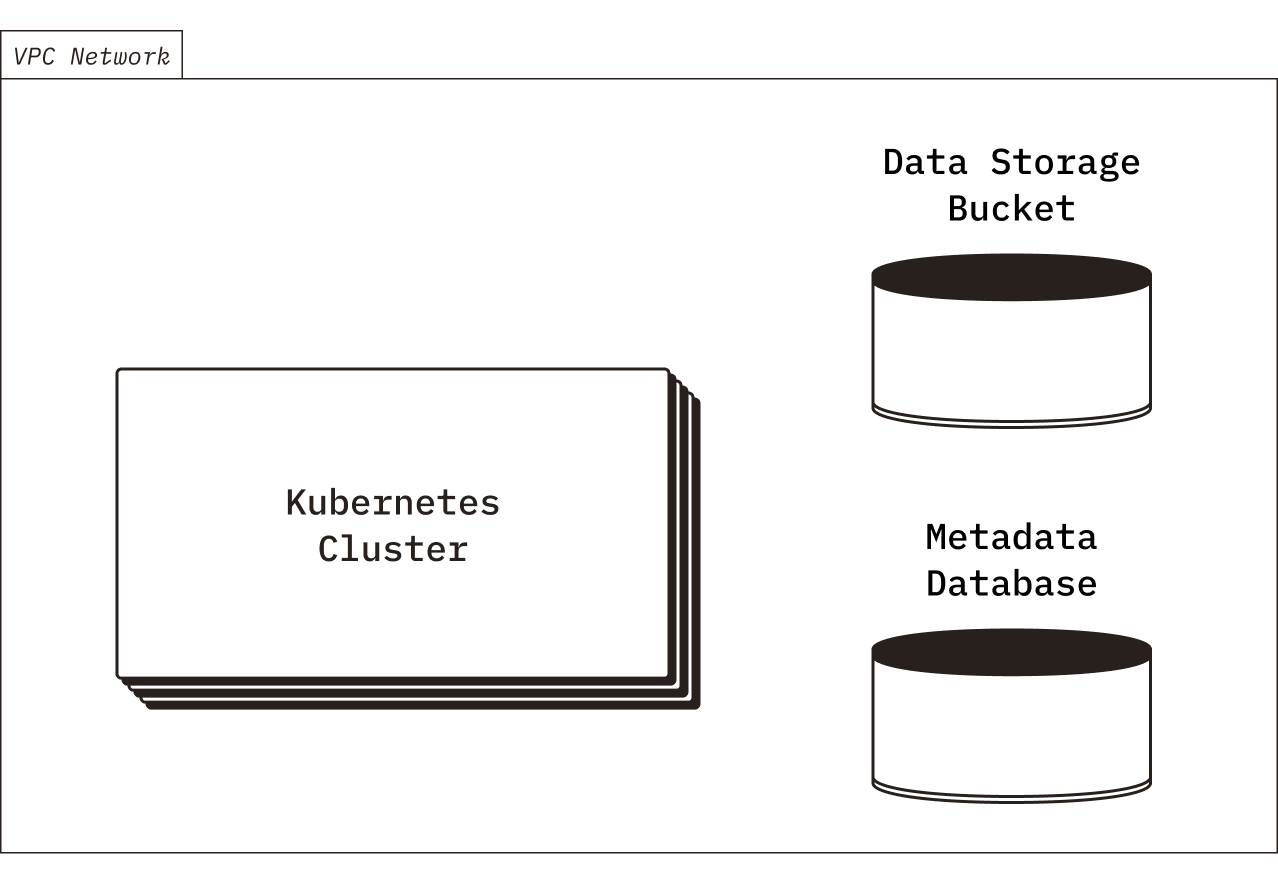
First, you will deploy all of the supporting cloud infrastructure using the Terraform modules provided by Chroma. Notably, Chroma requires a storage bucket (for persistent collection data storage), a relational database (for collection metadata storage), a Kubernetes cluster (for compute), and a VPC network.
Terragrunt
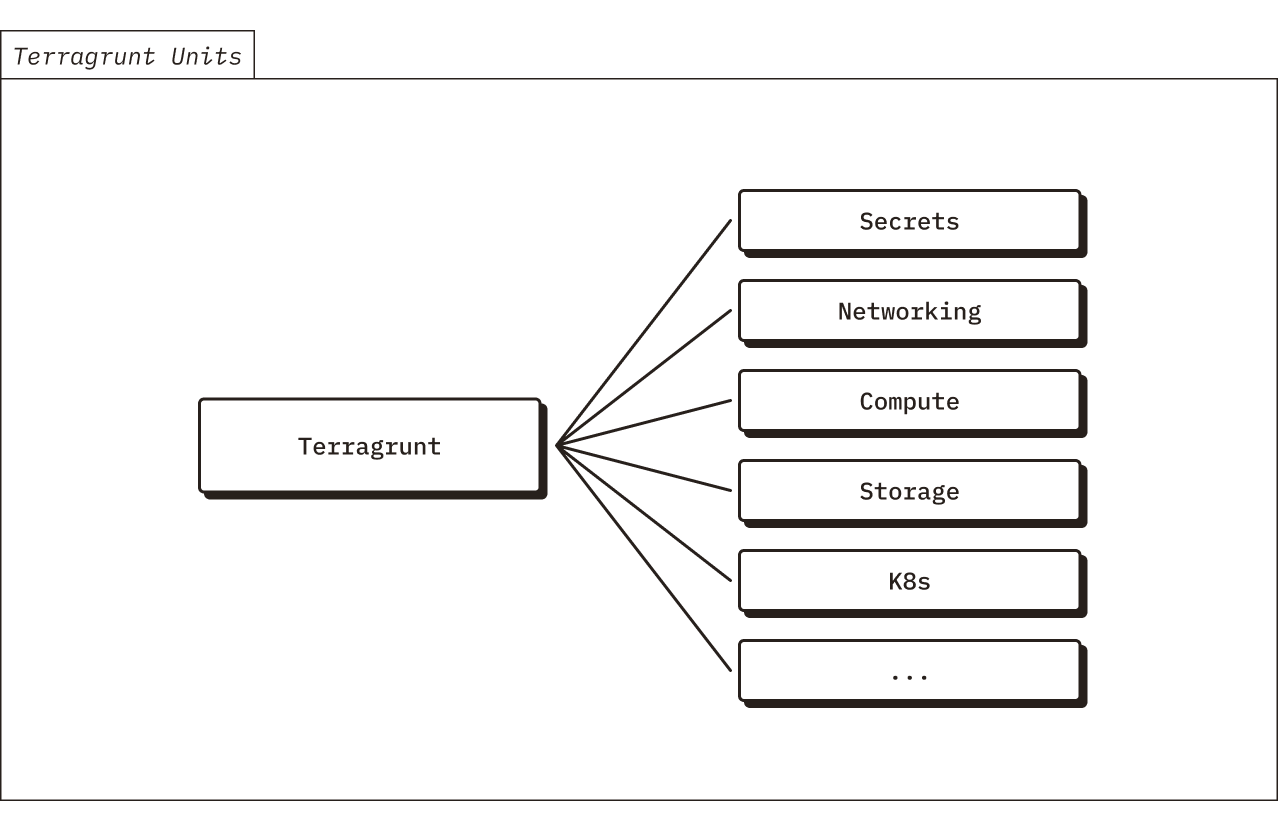
Chroma’s Terraform modules are deployed using Terragrunt. Terragrunt provides a convenience wrapper layer around Terraform. We find that using Terragrunt provides some nice-to-have features over Terraform, such as easier management of module dependencies and support for templating of provider configurations.
Secrets Management
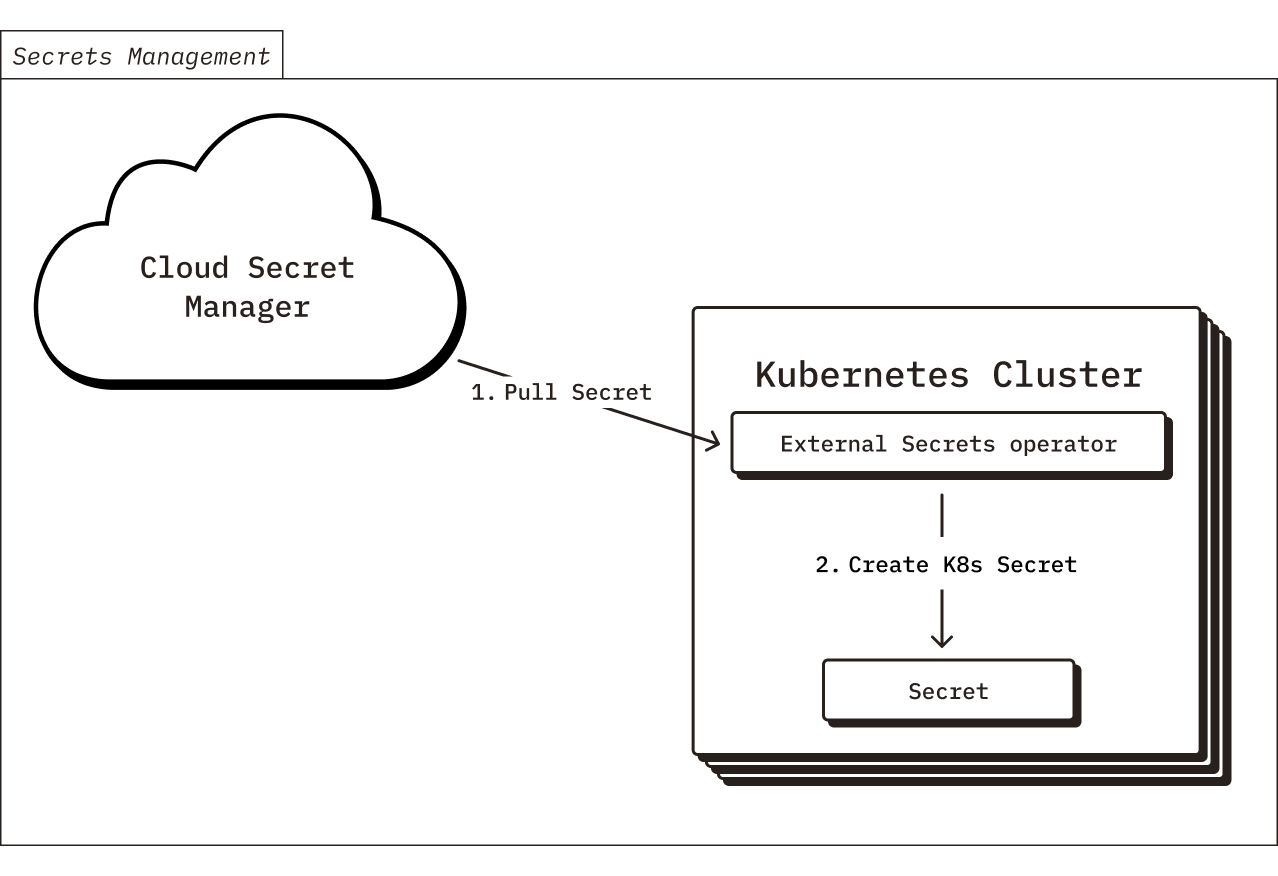
The Chroma deployment requires a few secrets for various purposes (such as API keys for exporting telemetry, a password for the RDS database, etc). These secrets are stored in your cloud provider’s secret manager (either AWS Secrets Manager or GCP Secret Manager) and they are made available to pods running in the Kubernetes cluster via the External Secrets Operator. To initialize the secrets for your Chroma deployment, you will push values into your cloud provider’s secret manager during the Terraform apply.
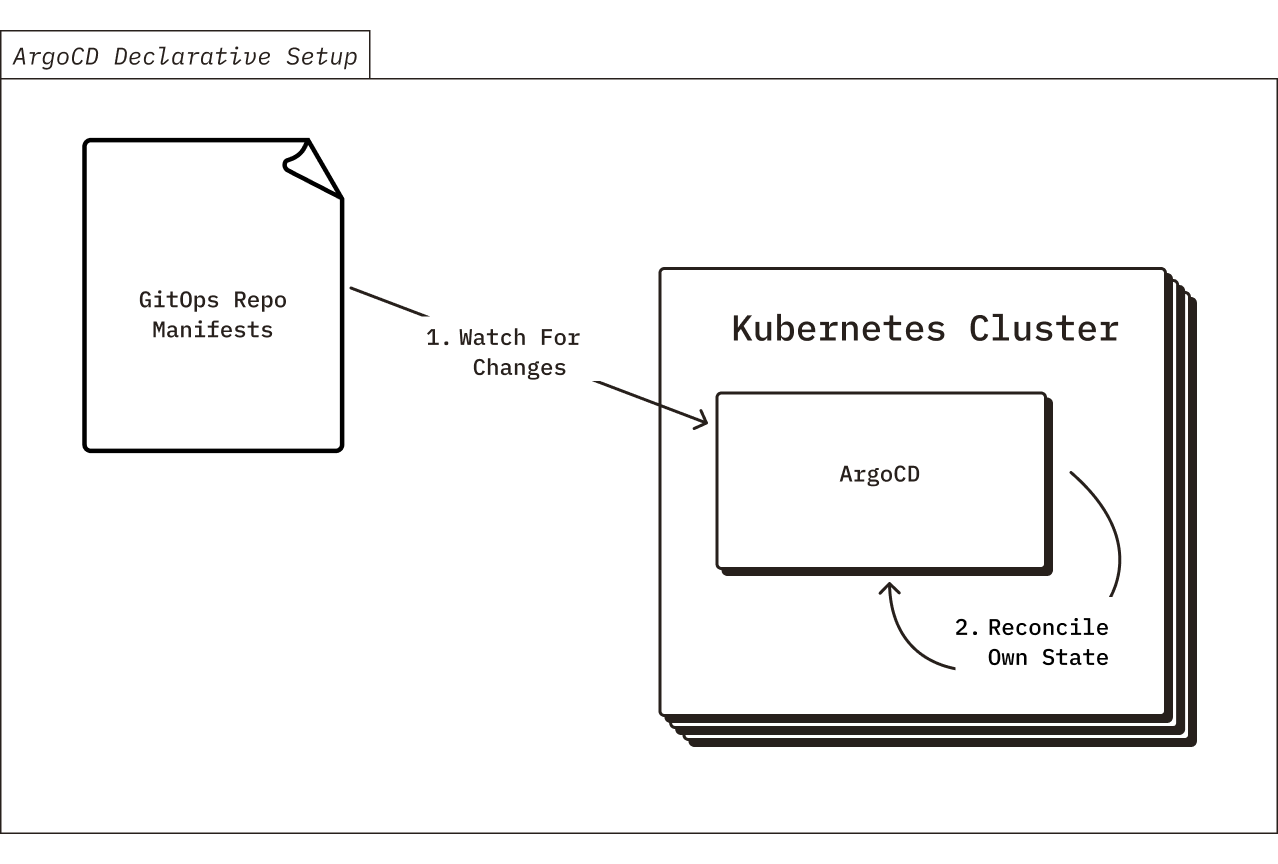
After deploying the supporting cloud infrastructure, the next step is to bootstrap a GitOps management system for of all of the Kubernetes resources that comprise your Chroma BYOC deployment. This requires setting up a Github repo to act as the “source of truth” for your Kubernetes cluster’s desired state. Then, you will deploy ArgoCD into your Kubernetes cluster and configure it to continuously apply your desired state, thereby syncing the manifests from your Github repo into your Kubernetes cluster.
With the GitOps system in place, it’s easy to perform the initial Chroma Kubernetes resources deployment. After pushing a commit to the GitOps repo that adds the YAML manifests for the Chroma Kubernetes resources, ArgoCD will apply the YAML to your cluster.
At this point, congrats, you have deployed Chroma!
As a side note, beyond just the initial deployment, you and Chroma will use the GitOps repo to coordinate all changes to your deployment going forward. All modifications, config adjustments, and upgrades will be recorded in the git history, providing a reliable audit log. You will have the opportunity to review and approve every change via Github pull requests.
ArgoCD Declarative Setup
In addition to using ArgoCD to manage all of the Chroma Kubernetes resources, we also use ArgoCD to self-manage itself. This is possible through the “ArgoCD Declarative Setup” pattern. All of the ArgoCD desired state is defined in YAML, in the GitOps repo. And, ArgoCD is configured to continuously sync from the GitOps repo. Therefore it will reconcile its own desired state. This allows us to easily have ArgoCD update and manage ArgoCD’s own state through GitOps, in addition to Chroma.
ArgoCD Rendered Manifest Pattern
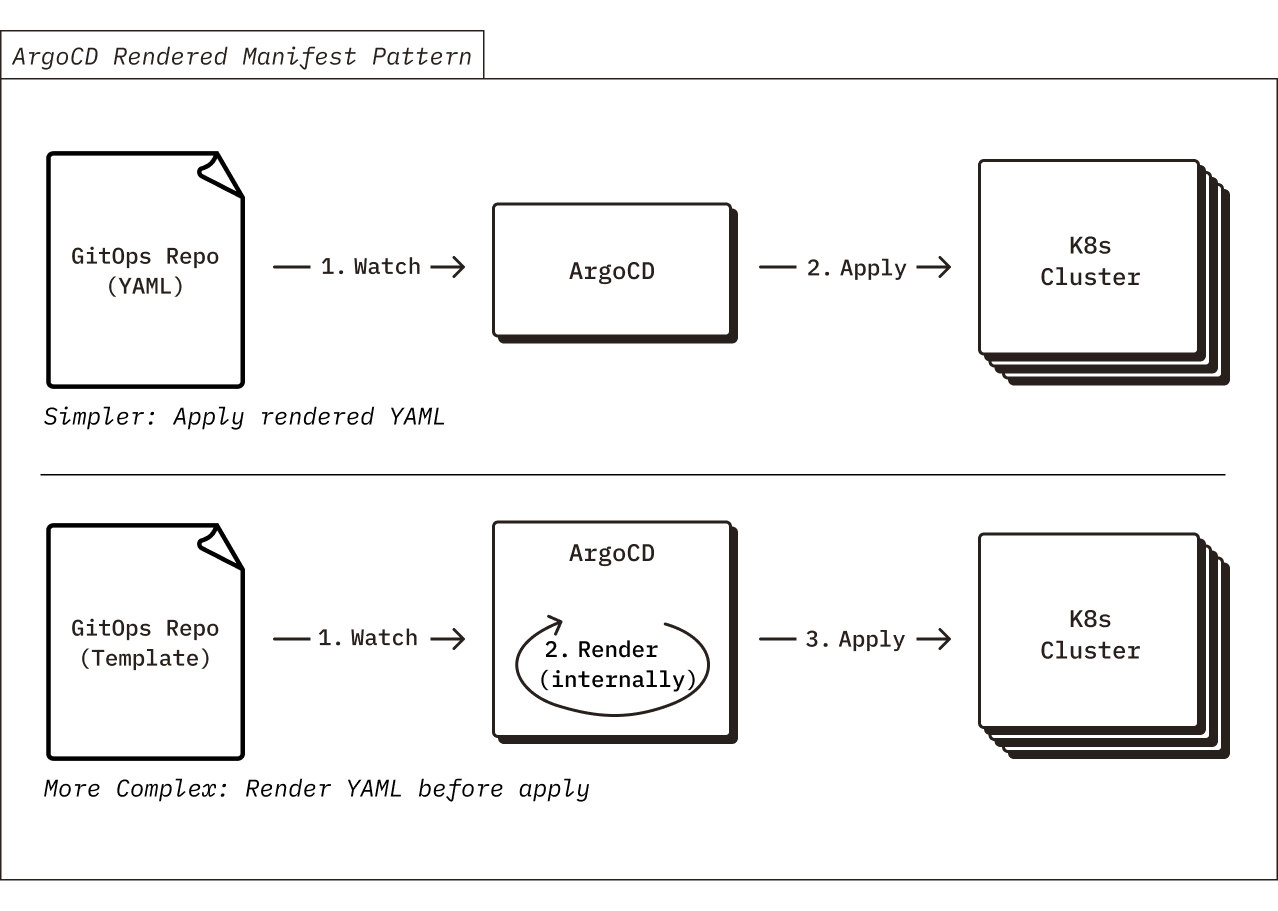
In an attempt to simplify our usage of ArgoCD, we have chosen to adopt the “Rendered Manifests Pattern” for the Chroma Kubernetes manifests, which removes cognitive overhead of reasoning about templating abstractions like Helm or Kustomize in your git → k8s sync process. While these templating tools are incredibly useful and provide obvious benefits for defining Kubernetes resource manifests (such as ability to avoid repetition a.k.a. DRY, ability to implement dependency logic, etc.), we find that it’s much simpler to store raw YAML in the GitOps repo and have ArgoCD sync the raw YAML (rather than storing a template in the GitOps repo and have ArgoCD render the template before applying it to your Kubernetes cluster). This way, there is no need to think through how the templating engine running in ArgoCD will transform your template, therefore making sync operations more predictable and reducing the risk of mistakes during updates.
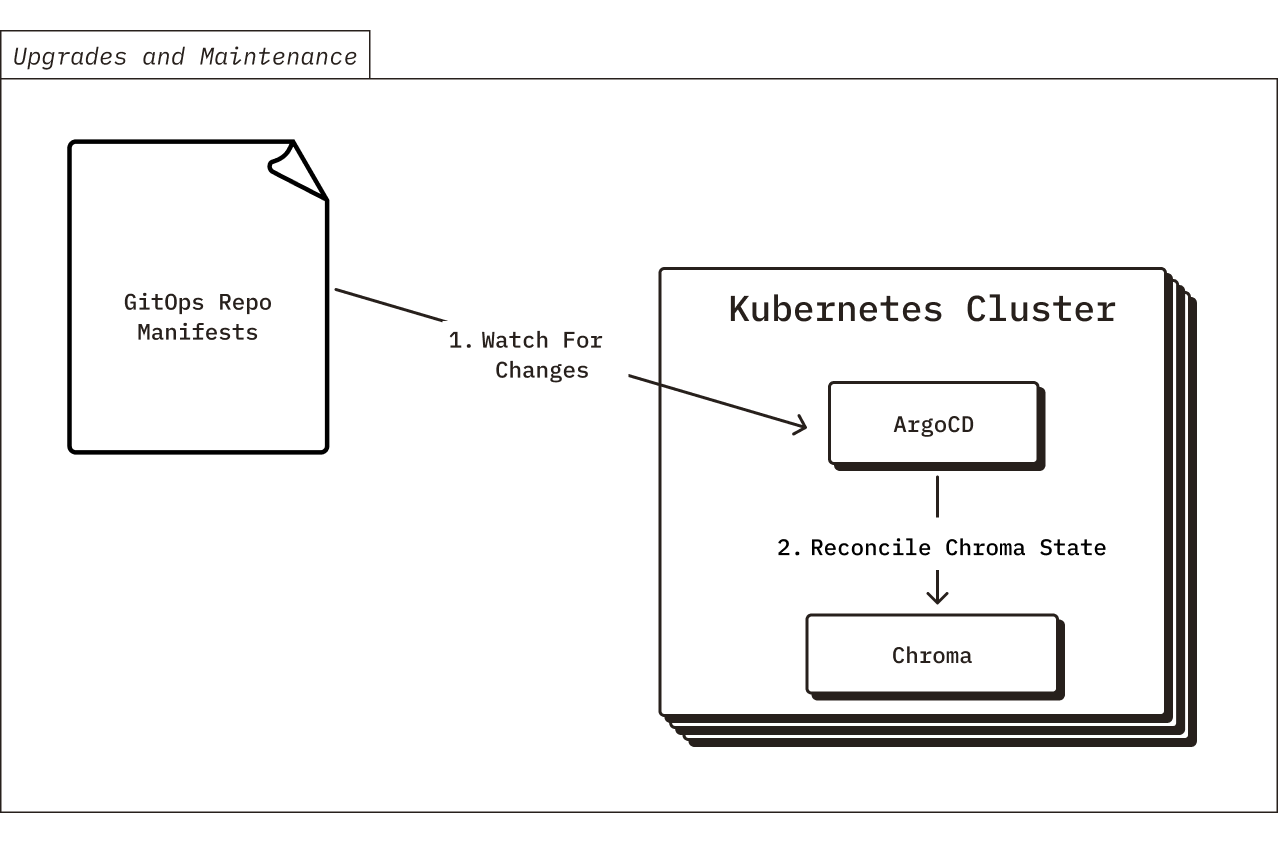
Now that you’ve deployed Chroma into your cloud environment, how will we maintain it going forwards? Chroma is a fast-moving product and we’re always adding new features. If you’d like to upgrade to a new version of Chroma with some of those new features, what’s the process?
Fortunately, after setting up the GitOps system during the initial deploy, it’s simple to perform any upgrades, config changes, or other “Day 2” operations. Anytime there is a new release of Chroma, we will push the new manifests to your GitOps repo via a GitHub PR. After you verify, approve, and merge the PR, the ArgoCD instance running in your Kubernetes cluster will detect the changes and apply them. Similarly, we will coordinate any config changes to your BYOC deployment through PRs to your GitOps repo. From a compliance perspective, this also works quite nicely. Every change must be approved before ArgoCD will apply it, and the entire change history will be tracked in your git repository.
Sometimes, rarely, Chroma upgrades will require changes to the supporting cloud infrastructure that is managed by Terraform. For these sorts of changes, Chroma will release new versions of our Terraform modules, and you will need to manually apply them (using Terragrunt) to update your cloud infrastructure before it will be possible to upgrade the Chroma Kubernetes deployment. While we don’t often change the supporting cloud infrastructure for Chroma, versioning our Terraform modules and recording the changes in your GitOps repository ensures that we maintain IaC best practices.
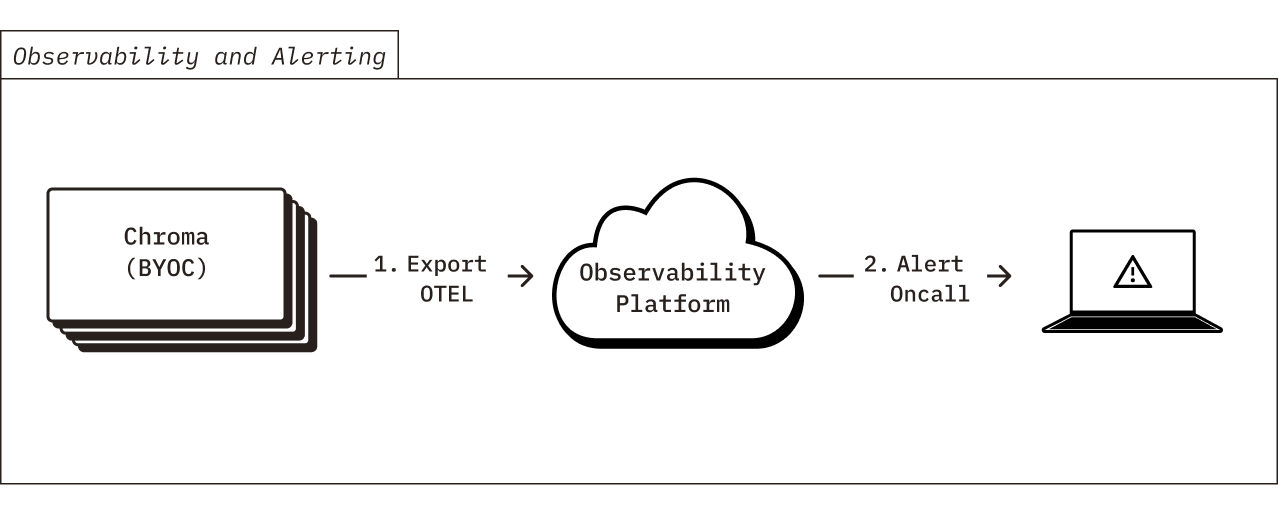
As part of the BYOC product, Chroma engineers are oncall 24/7 to help maintain your environment. As such, Chroma exports telemetry data to our observability platform that contains usage metrics, code execution traces, and CPU / memory profiling. We use the telemetry data to generate alerts if there is any issue or errors with your deployed environment, so that we can respond quickly and recommend effective solutions. None of the exported telemetry contains sensitive information about your environment or your Chroma data. All of the exported telemetry is in standard OpenTelemetry format, and can be forwarded to your team’s observability platform if you would like to maintain additional visibility of the telemetry data.
We’ve built the Chroma BYOC deployment model to provide the best of both worlds: a “managed” product that Chroma fully-supports where you maintain full control over the cloud infrastructure and your data sovereignty. The GitOps-based deployment method simplifies operations, upgrades, and maintenance by leveraging common open-source tools and cloud infrastructure best practices.
Ultimately, choosing Chroma BYOC over any other solution comes down to flexibility, developer experience, and long-term control. Chroma’s open-source foundation lets teams move seamlessly from experimentation to production without rethinking their architecture, while avoiding cloud vendor lock-in and keeping costs predictable with an efficient storage model. And when regulatory or security constraints require data to live inside your own environment, Chroma BYOC provides the same core advantages in addition to operational support from Chroma’s engineering team, making it the ideal choice for mission-critical workloads.
Keep your search infrastructure and sensitive data within your own cloud environment while Chroma's team handles operations, upgrades, and 24/7 support.
Talk to an engineer to get started.