Introducing Chroma Sync
Announcing Chroma Sync, automatically chunk, embed, and index external data sources directly into Chroma Cloud, starting with GitHub repositories.
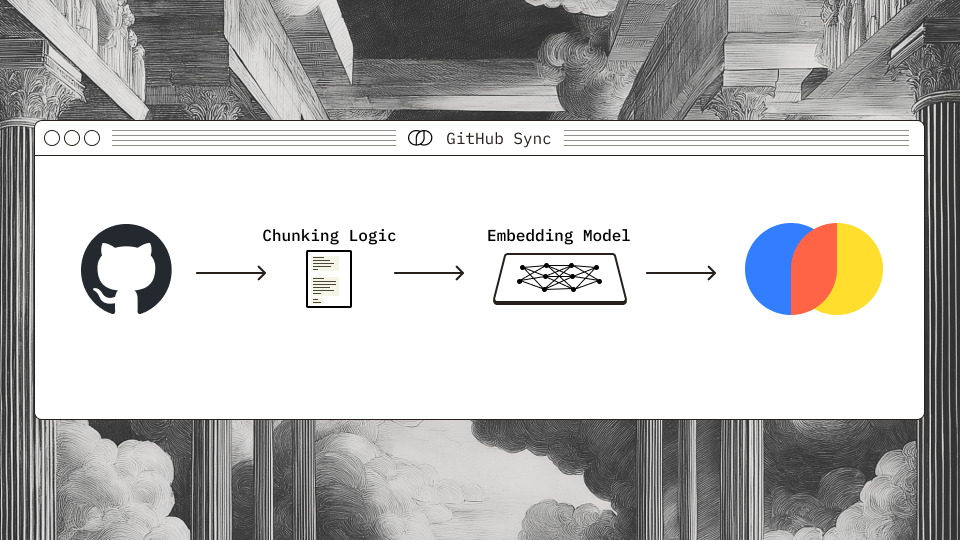
Sync gives you an easy, reliable way to index external data sources without building or maintaining ingestion pipelines. Quickly turn a GitHub repository into a searchable index that stays up to date with your codebase.
GitHub Sync#
At launch, the first supported source for Chroma Sync is GitHub. By combining Sync with Chroma Cloud’s collection forking, every commit and branch in a repository can be indexed cheaply and efficiently without duplicating the underlying data. Collection Forking lets the system reuse the same stored chunks, embeddings and documents across multiple collections, so each new branch or commit only requires re-indexing the diff of the two commits, not reprocessing the entire repo. That means you can maintain fast, fine-grained snapshots of your codebase over time, making version-aware retrieval practical and cost-effective.
Chroma Sync is especially useful for background agents, where access to the full contents of a repository can be slow to access. Instead of relying on a local clone or mounting the repo on disk, you can query the codebase directly from Chroma at the exact commit or branch you care about. That means build pipelines, review bots, test runners and cloud code agents can access structured context about the code without extra infrastructure. Sync turns your repo into a queryable code source, making it easier to integrate retrieval into automated workflows.
Authentication#
Chroma Sync supports two authentication flows for GitHub repositories. The simplest option is to use the Chroma Cloud GitHub App, which lets developers OAuth directly against Chroma to grant access to their repositories. This is ideal for quickly syncing personal or organization-owned repos without additional setup.
For teams building products on top of Chroma, there’s a second option: bring your own GitHub App. In this flow, your users authenticate against your GitHub App, and Chroma uses the associated app key to interact with GitHub on your behalf. This allows you to fully control the authorization flow and keep the integration aligned with your product’s security and permission model without ever exposing customer credentials to Chroma directly.
You can use the direct OAuth sync path in Chroma Cloud today by installing the Chroma Cloud GitHub App and authenticating your repositories. For teams that want to sync customer repos, support is available now, just reach out to hello@trychroma.com to get set up.
GitHub is our first supported source, with more to come soon. We can’t wait to see what you build with it.